
✅ What Is docBurst?
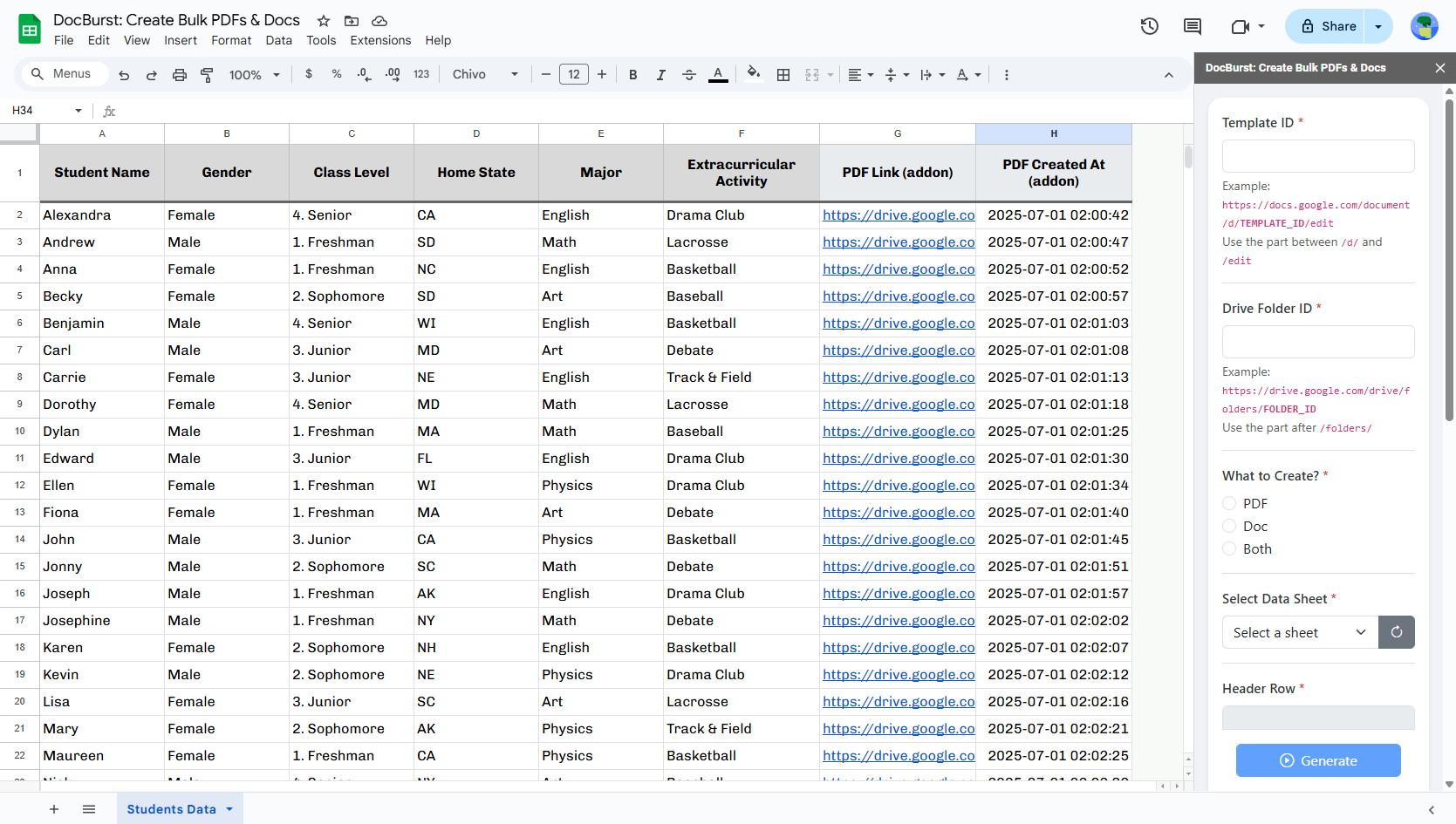
docBurst lets you bulk-generate Google Docs and PDFs from your spreadsheet rows using a single Docs template with placeholders like {{Name}}.
✔️ Create Docs, PDFs, or both
✔️ Name files dynamically using columns or patterns
✔️ Auto-track created file links and timestamps
✔️ Restart generation anytime without duplication
📌 Key Things to Know
#️⃣ Tag Format: Use {{ColumnName}} inside your Docs template:
🔹 Must exactly match spreadsheet column names
🔹 Tags are case-sensitive
🚫 No Duplicate Headers:
▪️Header row must contain unique column names only
▪️The selected header row must not be entirely blank — it should contain at least one valid column name.
📍Tracking Fields: The tool uses columns like:
▪️PDF Link (addon), PDF Created At (addon)▪️Doc Link (addon), Doc Created At (addon)These track output files and prevent re-creation
♻️ Partial Regeneration: To re-create a PDF/Doc for a specific row:
🔹Just clear the values from tracking fields in that row
🔹Click Generate — it will only process rows where tracking fields are blank
⏳Script Runtime Limit:
▪️Free Google account → up to 6 minutes
▪️Google Workspace account → up to 30 minutes
If the tool stops midway due to time limit, just run again — already created files will be skipped
🧩 Installing docBurst
- Open your Google Spreadsheet
- Go to Extensions → Add-ons → Get add-ons
- Search for docBurst
- Click Install and allow permissions
🧾 How to Use docBurst — Step by Step
1️⃣ Open Sidebar
Go to: Extensions → docBurst → Start
2️⃣ Fill Required Fields
🧩 Template ID:
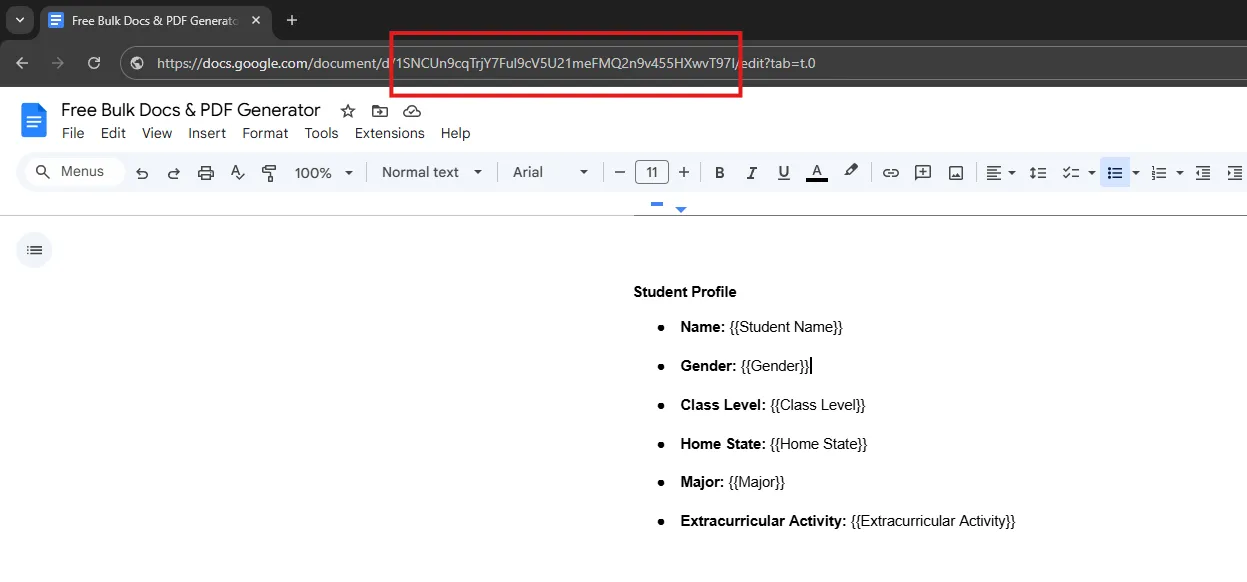
- Open your Docs template
- Copy the ID from:
https://docs.google.com/document/d/TEMPLATE_ID/edit - Paste it into the Template ID input
📁 Drive Folder ID:
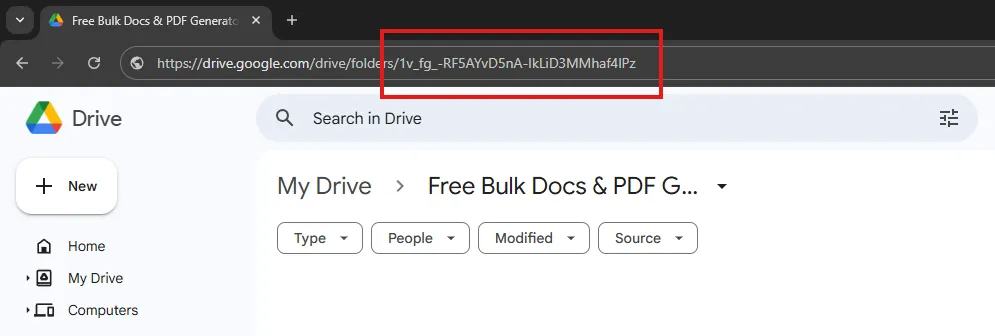
- Open destination folder in Drive
- Copy ID from:
https://drive.google.com/drive/folders/FOLDER_ID - Paste it into the Folder ID input
🧾 What to Create?
Choose: PDF / Doc / Both
📊 Select Data Sheet:
Pick the sheet with your data
🔢 Header Row:
Enter row number (usually 1)
⚠️ Must not have duplicate column names.
3️⃣ Select Mandatory Fields (Optional)
Choose fields that must be filled — if any are blank in a row, that row is skipped.
4️⃣ Choose Naming Option
🔘 Use a Column: Choose a column like Full Name
🔘 Use a Pattern: e.g., {{First Name}} - {{Email}}
5️⃣ Click Generate:
The tool will:
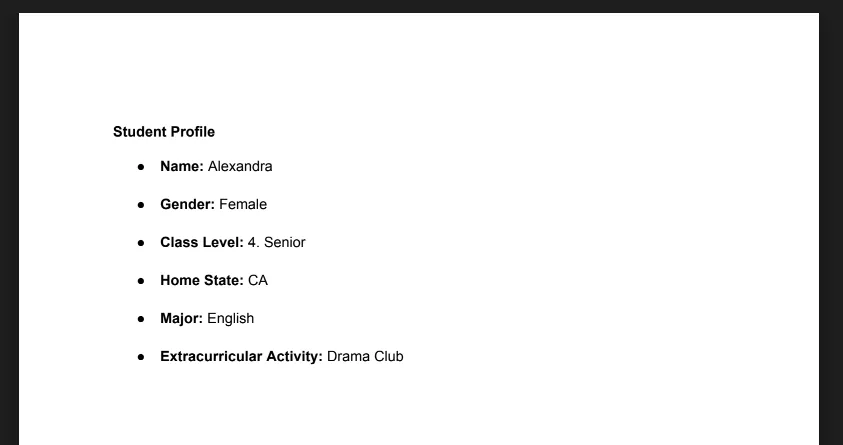
- Replace tags with actual data
- Create Docs and/or PDFs
- Save files in the selected Drive folder
- Store links and timestamps in tracking fields
♻️ Regeneration Logic
Want to recreate files for specific rows?
- Delete values in:
PDF Link (addon)orPDF Created At (addon)for PDFsDoc Link (addon)orDoc Created At (addon)for Docs - Click Generate again
➤ The tool will only recreate files where tracking fields are blank.
⚠️ Runtime Limitation
- Google limits how long scripts can run:
▪️6 minutes for free accounts
▪️30 minutes for Workspace accounts - If the script stops midway:
➤ Just run Generate again
➤ Already-created rows will be skipped
💬 Need Help?
Click Contact Us from the sidebar for:
- Suggestions
- Feature requests
- Bug reports
- Feedback or support
- Report bugs
- Share ideas
- Request urgent help
- Share ideas